
Image Viewer CP Pro SDK ActiveX 25.0
Platform : Windows 11, Windows 10, Windows 8, Vista, XP
It is a PDF Viewer, EPUB and Document Viewer SDK , Export to PDF ,Image processing, 1D and 2D Barcode Reader, Writer, DICOM and OCR with C#, C , VB.NET , VB, Delphi, Vfp, MS Access.


VB.NET - How to create EPUB Reader
Step 1: To install the Image Viewer CP Pro ActiveX Control, begin by launching the setup file (imageviewercpprosetup.exe). Select the desired installation folder for the Image Viewer CP Pro ActiveX and continue with the installation on your development computer.
Step 2: Create New Visual Basic Project, select Windows Application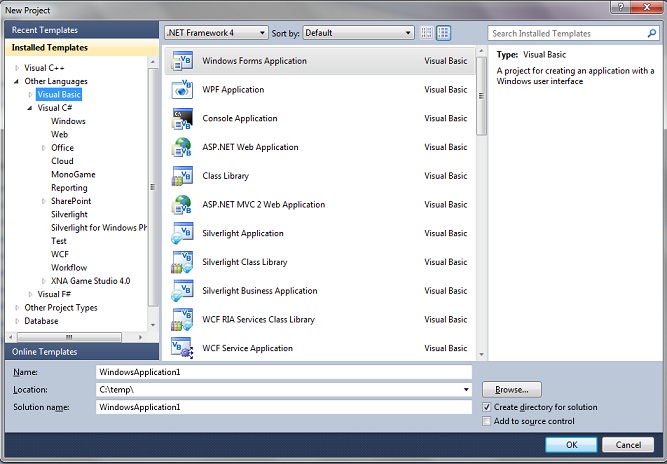
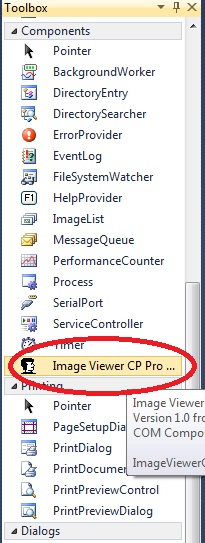
Step 3: The next step is to install Image Viewer CP Pro ActiveX in ToolBox. Select Toolbox, select Components item, right click mouse button, select Choose Items...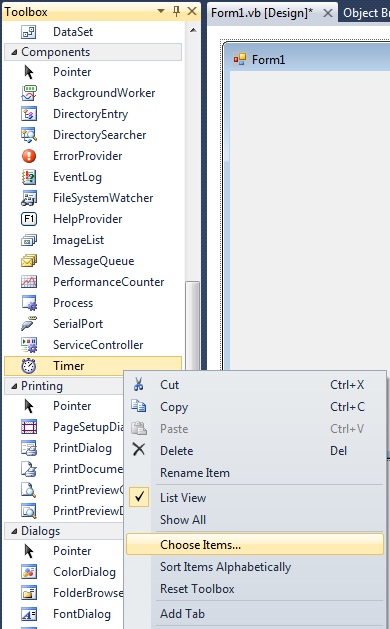
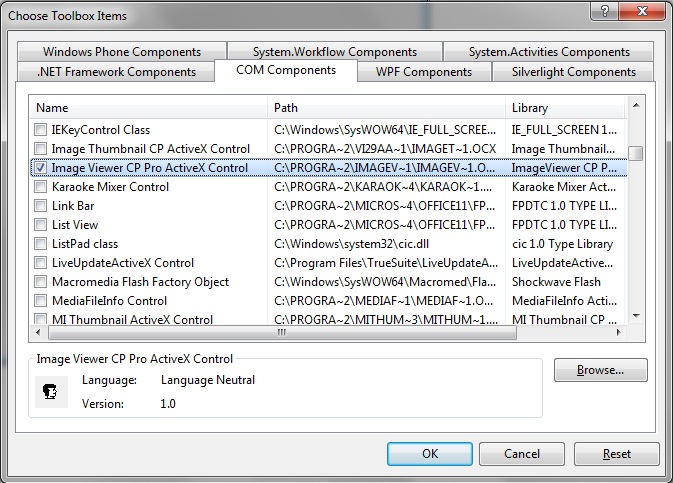
Step 4: Select COM Components tab, select Image Viewer CP Pro ActiveX Control , click OK.
button - Text - Open EPUB , Name - btnopen
button - Text - First , Name - btnfirst
button - Text - Previous , Name - btnprev
button - Text - Next , Name - btnnext
button - Text - Last , Name - btnlast
textbox - Name - txtcurrent
textbox - Name - txttotalpage
button - Text - Export Text, Name btnexport
Label - Text - Current Page , Name - Label1
Label - Text - / , Name - Label2
Label - Text - / , Name - Total Page
Step 7: Drag OpenFileDialog Control from toolbar to form.
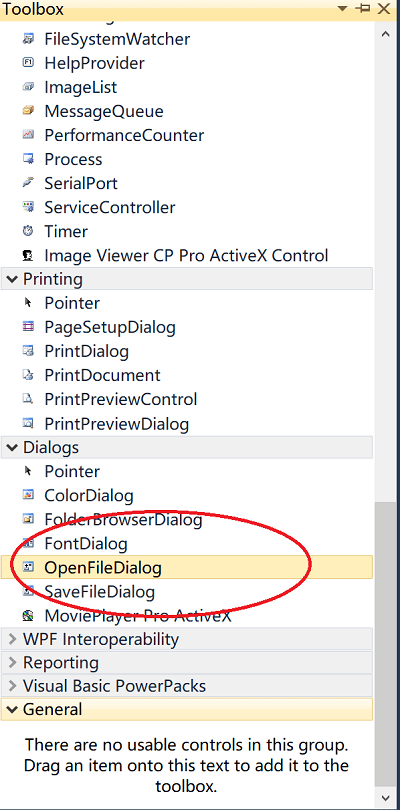
Step 8: Add the following code to btnopen click event.
Step 5: Now you will see the Image Viewer CP Pro ActiveX's icon on toolbox, drag it to form.
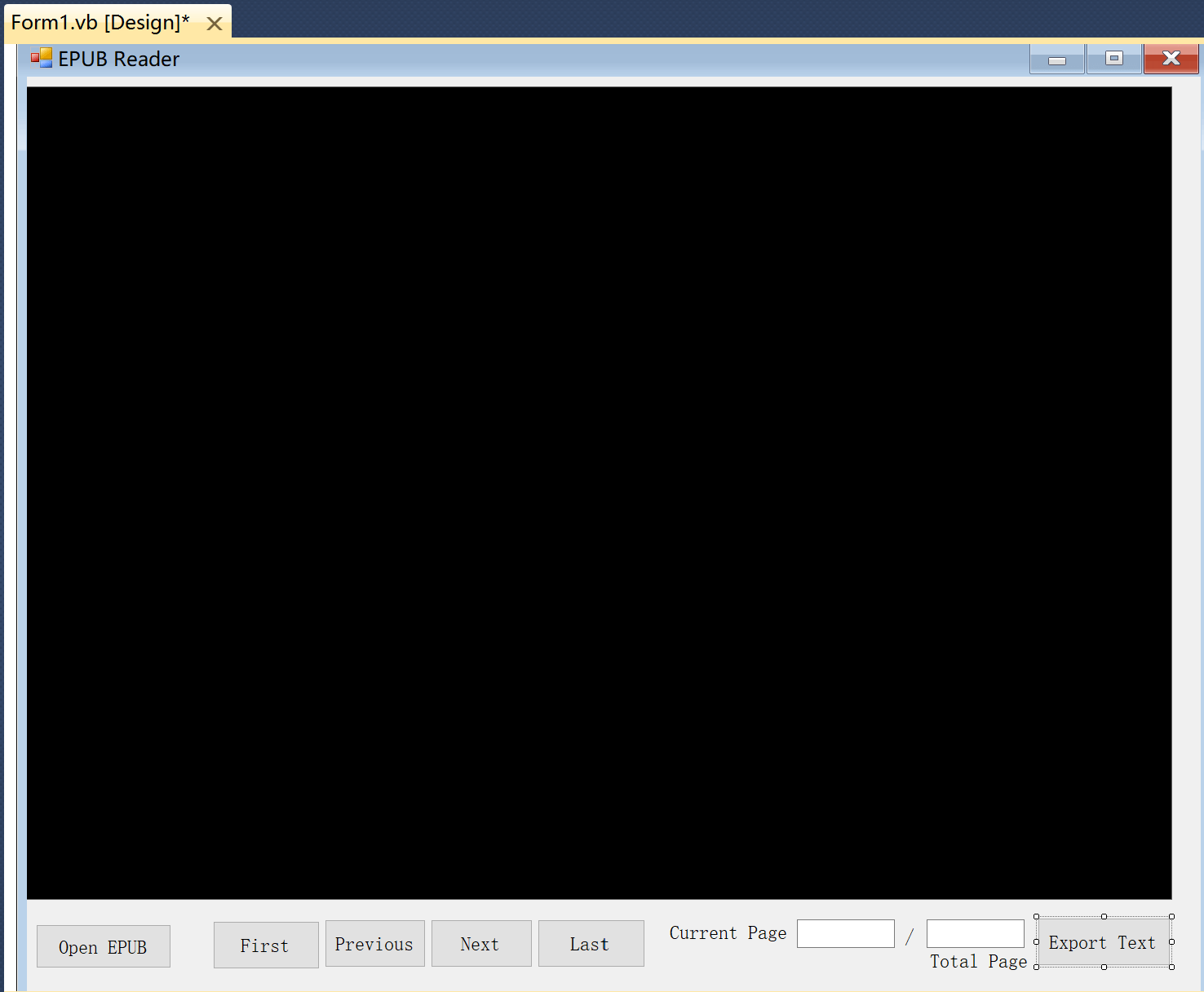
Step 6: Design the UI same as the following
button - Text - Open EPUB , Name - btnopen
button - Text - First , Name - btnfirst
button - Text - Previous , Name - btnprev
button - Text - Next , Name - btnnext
button - Text - Last , Name - btnlast
textbox - Name - txtcurrent
textbox - Name - txttotalpage
button - Text - Export Text, Name btnexport
Label - Text - Current Page , Name - Label1
Label - Text - / , Name - Label2
Label - Text - / , Name - Total Page
Step 7: Drag OpenFileDialog Control from toolbar to form.
Step 8: Add the following code to btnopen click event.
Private Sub btnopen_Click(sender As System.Object, e As System.EventArgs) Handles btnopen.Click
OpenFileDialog1.Filter = "EPUB file|*.epub||"
If OpenFileDialog1.ShowDialog() = DialogResult.OK Then
AxImageViewer1.LoadMultiPage(OpenFileDialog1.FileName, 1)
AxImageViewer1.SetControlFocus()
txttotalpage.Text = AxImageViewer1.GetTotalPage
txtcurrent.Text = 1
End If
End Sub
Step 9: Add the MoveToPage Procedure , use the following code.
Step 9: Add the MoveToPage Procedure , use the following code.
Private Sub MoveToPage()
AxImageViewer1.LoadMultiPage(OpenFileDialog1.FileName, txtcurrent.Text)
txttotalpage.Text = AxImageViewer1.GetTotalPage().ToString
End Sub
Step 10: Add the following code to btnfirst click event. Private Sub btnfirst_Click(sender As System.Object, e As System.EventArgs) Handles btnfirst.Click
txtcurrent.Text = "1"
MoveToPage()
AxImageViewer1.SetControlFocus()
End Sub
Step 11: Add the following code to btnprev click event.
Step 12: Add the following code to btnnext click event.
Step 13: Add the following code to btnlast click event.
Step 11: Add the following code to btnprev click event.
Private Sub btnprev_Click(sender As System.Object, e As System.EventArgs) Handles btnprev.Click
Dim page As Integer
Dim count As Integer
page = txtcurrent.Text
count = AxImageViewer1.GetTotalPage()
If (page > 1) Then
page = page - 1
End If
txtcurrent.Text = page
MoveToPage()
AxImageViewer1.SetControlFocus()
End Sub
Step 12: Add the following code to btnnext click event.
Private Sub btnnext_Click(sender As System.Object, e As System.EventArgs) Handles btnnext.Click
Dim page As Integer
Dim count As Integer
page = txtcurrent.Text
count = AxImageViewer1.GetTotalPage()
If (page < count) Then
page = page 1
Else
page = count
End If
txtcurrent.Text = page
MoveToPage()
AxImageViewer1.SetControlFocus()
End Sub
Step 13: Add the following code to btnlast click event.
Private Sub btnlast_Click(sender As System.Object, e As System.EventArgs) Handles btnlast.Click
txtcurrent.Text = AxImageViewer1.GetTotalPage().ToString()
MoveToPage()
AxImageViewer1.SetControlFocus()
End Sub
Step 14: Drag SaveFileDialog Control from toolbar to form.
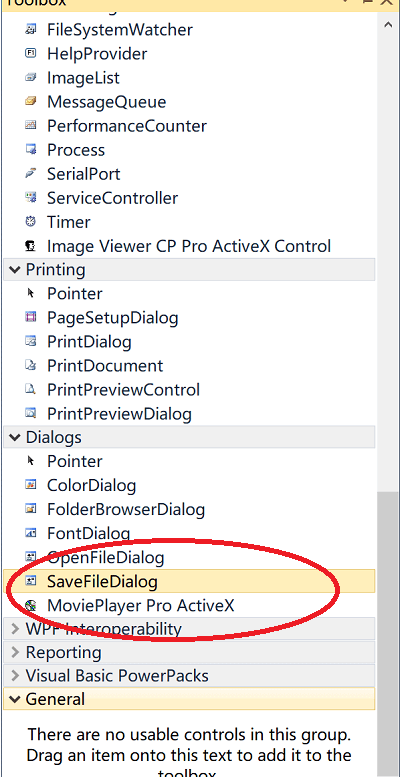
Step 14: Drag SaveFileDialog Control from toolbar to form.
Step 15: Add the following code to btnexport click event.
Private Sub btnexport_Click(sender As System.Object, e As System.EventArgs) Handles btnexport.Click
SaveFileDialog1.Filter = "Text file (*.txt)|*.txt||"
SaveFileDialog1.DefaultExt = "txt"
Dim bResult As Boolean = False
If SaveFileDialog1.ShowDialog() = System.Windows.Forms.DialogResult.OK Then
bResult = AxImageViewer1.PDFExportText(SaveFileDialog1.FileName, txtcurrent.Text, 0)
If bResult Then
MessageBox.Show("Export text completed")
End If
End If
Latest Releases
- PDF Viewer SDK ActiveX x64 9.0 Released (21 September, 2026)
- PDF Viewer SDK ActiveX 13.0 Released (17 September, 2026)
- Image Viewer CP Pro SDK ActiveX 25.0 Released (17 June, 2026)
- Image Viewer CP SDK ActiveX x64 18.0 Released (13 May,2026)
- PDF Viewer SDK ActiveX x64 8.5 Released (23, February, 2026)
- PDF Viewer SDK ActiveX 12.0 Released (4 February, 2026)
- VideoCap Live Streaming SDK ActiveX 13.0 Released (19 January, 2026)
- Image Viewer CP Gold SDK ActiveX Released (14 January, 2026)
- Image Viewer CP Pro SDK ActiveX 24.5 Released (12 January, 2026)
- VideoCap Pro SDK ActiveX 18.0 Released (13 December, 2025)
- View All

Popular Solutions
- VB6 - How to add PDF Stamp to a PDF
- VFP - How to add PDF Stamp to a PDF
- C# - How to add PDF Stamp to a PDF
- VB.NET - How to add PDF Stamp to a PDF
- VB.NET - How to create EPUB Reader
- Bug Fixes -VideoCap Pro SDK ActiveX, VideoCap SDK, VideoCap Pro ActiveX x64: display empty video format on some Windows OS.
- MS Access 2016 - How to Convert text to speech
- Free Video Converter - Add Overlay Image on Video
- VB.NET - How to display PDF Thumbnail and PDF Viewer
- C# - PDF Viewer SDK ActiveX 9.0 fixed the display PDF issue
- View All
Special Offers
